
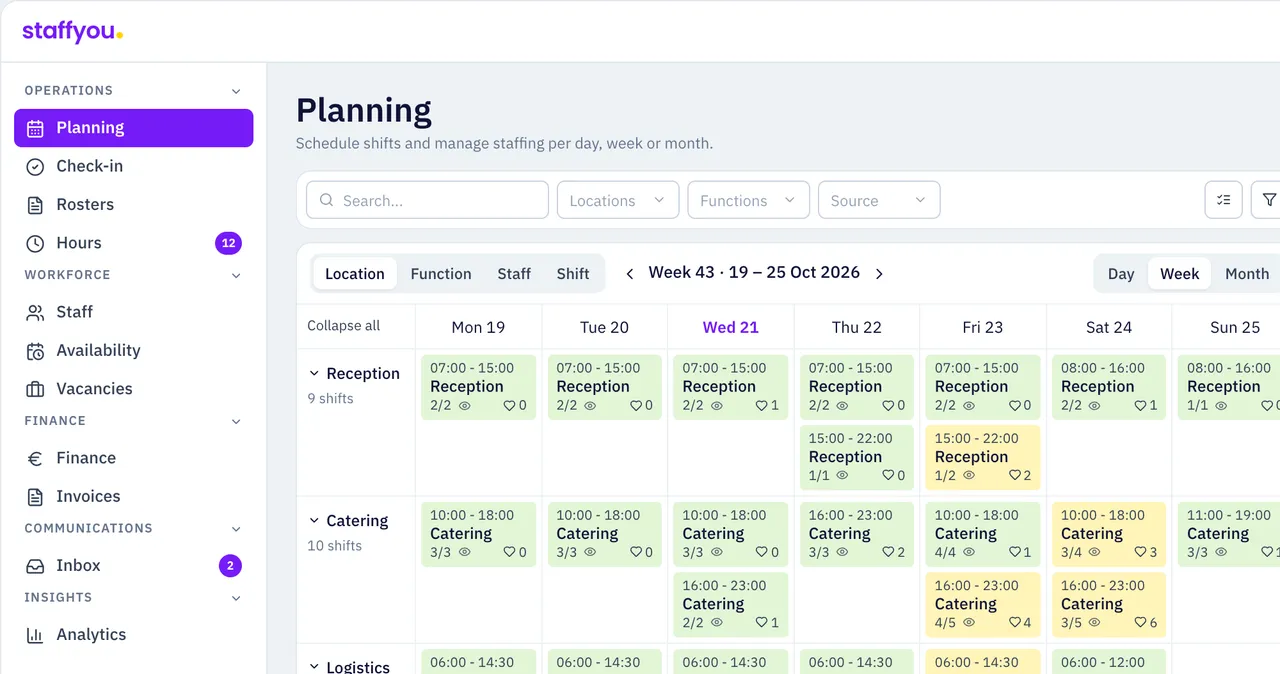
Plan your own employees, work with staffing agencies and arrange extra flex workers. All from one platform.
Shiftbase
According to its own site, Shiftbase brings scheduling, time tracking and payroll preparation together for your own team.
- Scheduling with availability, open shifts and swaps
- Clocking in via app, browser or tablet
- More than 40 integrations, including AFAS, Nmbrs and Loket
- Per employee per month; free for up to 15 employees
Staffyou combines workforce planning with arranging extra flex workers, from one platform.
See the differencesBook a demoSide by side
Shiftbase and Staffyou WFM side by side
| Topic | Shiftbase | staffyou WFM |
|---|---|---|
| SchedulingBoth | Availability, open shifts and swaps; auto-scheduling in early access12 | Shift templates and a proposal based on availability, skills, cost and rules |
| Time trackingBoth | Clocking in via app, browser or tablet9 | Check-in on the scheduled shift, work tickets and digital approval |
| Agencies | ‘Hiring agency workers from the same system’: no, per Shiftbase’s own comparison with Dyflexis4 | Supplier portal, SETU and self-billing |
| Flex workers | Flex pool from Premium: your own employees in another department or location13 | Own flex pool, then agencies and optionally the Staffyou marketplace |
| IntegrationsBoth | More than 40 integrations, including AFAS, Nmbrs, Loket and Exact Online57 | Open API for payroll and HR packages, such as AFAS; SETU for agencies |
| Pricing model | Per employee per month; free for up to 15 employees, paid from €30 per month1 | €0.15 per scheduled hour; first 500 hours per month free |
| Scalability | Free 1 department, Basic 5, unlimited from Premium; custom above 250 employees1 | Unlimited users and locations |
| SupportBoth | Email, phone and chat on weekdays, 9am–5pm (paid plans)81 | Seven days a week, 7am–7:30pm |
The numbers after a cell refer to the sources at the bottom of the page. ‘Both’ means both products offer this, each in its own way.
Which one fits
Which platform suits your organisation?
Both are scheduling tools for businesses that work in shifts. The main difference is what happens when your own team cannot fill a shift.
Shiftbase is a logical choice if you…
- mainly work with a permanent team
- want employee records in the same system
- want to start free with a small team
- need a ready-made payroll or POS integration
Staffyou WFM is a logical choice if you…
- regularly use flex workers or agencies
- want agency hours and invoices in one chain
- have many people working few hours
- want certificates and collective agreement rules checked at check-in too
How it works
Scheduling: from shift template to published roster
In Staffyou WFM you create shift templates per role and location, and the algorithm proposes a schedule based on availability, skills, cost and rules. You check it and publish with one click.
The Working Hours Act, collective agreement rules and certificates are checked while you schedule, and again at check-in and on the hours.
- Shift templates per role and location
- Proposal based on availability, skills, cost and rules
- Copy rosters to other locations
- Publish with one click
How Staffyou WFM fills an open shift
When someone calls in sick or a shift stays open, Staffyou WFM searches in the order you set: your own team first, then your flex pool, then agencies and, only if you switch it on, the Staffyou marketplace.
Agencies work in a free supplier portal or through SETU, with self-billing. Staffyou Agent finds same-day cover via WhatsApp, and Staffyou ID verifies identity before the first shift.
- Own team, flex pool and agencies in one roster
- Free supplier portal or SETU for agencies
- Same-day cover via WhatsApp
- Optional Staffyou marketplace
Hours: from check-in to invoice
Employees check in on their scheduled shift. The hours worked go on a work ticket that the manager approves digitally, and you see deviations before they reach payroll or an invoice.
Approved hours go to payroll through the open API, or to self-billing for connected agencies.
- Check-in on the scheduled shift
- Work ticket per shift, approved digitally
- Rules checked again on the hours worked
- Self-billing for agencies
Pricing
Pricing: per employee or per scheduled hour
Shiftbase charges a monthly amount that includes a number of employees, plus an amount per extra employee. Staffyou WFM charges per scheduled hour, however many people or locations are in the system.
Shiftbase
- Free
- €0
- Up to 15 employees, one department
- Basic
- €30 per month
- Includes 6 employees, €4 per extra employee
- Premium
- €72 per month
- Includes 12 employees, €5 per extra employee; with flex pool
- Enterprise
- €336 per month
- Includes 48 employees, €6 per extra employee
On monthly billing; 10% off with annual billing. Add-ons, such as App Center+ (€20 per month), come on top. Shiftbase does not state whether VAT is included.1
staffyou WFM
- Per scheduled hour
- €0.15
- The first 500 hours per month are free
- Users and locations
- Unlimited
- Employees, planners and locations do not count
- Setup fees
- €0
- Cancellable monthly
As on the Staffyou pricing page.
See pricingWorked example
What does the same team cost per month?
Published prices on monthly billing, without add-ons. An example, not a quote: features differ per plan.
| Scenario | Shiftbase | staffyou WFM |
|---|---|---|
| 15 employees, 1,000 hours | €0 (Free) or €66 (Basic) | €75 |
| 30 employees, 2,400 hours | €126 (Basic) or €162 (Premium) | €285 |
| 30 permanent and 90 flex workers, 2,400 hours | €486 (Basic) or €612 (Premium) | €285 |
Hours are scheduled hours per month. Shiftbase: base fee plus a price per extra employee; inactive employees do not count. The third example assumes all 120 people work that month. Staffyou WFM: (scheduled hours − 500) × €0.15.
Switching
Switching from Shiftbase to Staffyou WFM
According to Shiftbase, you can export employees, hours and leave whenever you want. You load employees and rosters into Staffyou WFM via API or file upload, then run in parallel for a while, location by location.
A pilot at one location can go live within a few weeks, including a load test. Support is available seven days a week, from 7am to 7:30pm.
Mind your notice period: according to Shiftbase it is one month on monthly billing, and a prepaid year is not refunded.
- Export employees, hours and leave from Shiftbase
- Import employees and rosters via API or file
- Start a pilot at one location, run in parallel
- Take planners and team leads along at the pilot location
- Cancel Shiftbase once the hours match
Client case
How Jaarbeurs Utrecht schedules
Jaarbeurs schedules staffing for trade fairs, congresses and events in Staffyou WFM: permanent staff, flex pool and external hiring in one roster, with self-billing per event.
Read the case study- 9
- departments in one workspace, from restaurants to warehouse and security
- < 1 hour
- in which flex workers usually respond to a posted shift after a last-minute drop-out
FAQ
Frequently asked questions
Shiftbase vs Staffyou WFM: what is the difference?
According to its own site, Shiftbase brings scheduling, time tracking and payroll preparation together for your own team, with a free plan for up to 15 employees. Staffyou WFM schedules your own team, flex pool and agencies in one roster, with optional flex workers through the Staffyou marketplace. Shiftbase charges per employee per month; Staffyou WFM charges €0.15 per scheduled hour, with the first 500 hours per month free.
Read more about Staffyou WFM
- Dyflexis alternative
- Planday alternative
- Werktijden.nl alternative
- ORTEC alternative
- Retail scheduling
- Staffyou WFM: the platform
- What does Staffyou WFM cost per hour?
- Comparing WFM software
- Case study: Jaarbeurs
Sources
What this comparison is based on
Sources, last checked on 22 October 2026. Information about Shiftbase comes only from Shiftbase’s own pages. Features and prices can differ per package and contract.
- 1shiftbase.com/nl/tarievenPlans and prices, trial, notice period, add-ons, flex pool in Premium
- 2shiftbase.com/nl/personeelsplanningAvailability, open shifts, swaps and flex pool
- 3help.shiftbase.com/nl/wat-is-een-flexpoolWhat the Shiftbase flex pool is
- 4shiftbase.com/nl/vergelijk/shiftbase-vs-dyflexisShiftbase’s own comparison: target group and hiring agency workers
- 5shiftbase.com/nl/salarisadministratiePayroll preparation and payroll integrations
- 6shiftbase.com/nl/complianceWorking-time law check while scheduling
- 7shiftbase.com/nl/switch-to-shiftbaseNumber of integrations and exporting data
- 8shiftbase.com/nl/contactSupport channels, hours and languages
- 9shiftbase.com/nl/urenregistratieClocking in via app, browser or tablet
See how Staffyou WFM plans your week?
In 30 minutes we schedule your busiest week in Staffyou WFM, including agencies and a sick call.
Book a demoSee pricingFrequently asked questions
Is Shiftbase cheaper than Staffyou WFM?
It depends on your team. Shiftbase charges per employee: free for up to 15 employees, Basic €30 per month including 6 employees plus €4 per extra employee. Staffyou WFM costs €0.15 per scheduled hour, with the first 500 hours per month free. With a permanent team, Shiftbase is often cheaper; with many people working few hours, Staffyou WFM usually is.
Does Shiftbase have a flex pool too?
Yes, from the Premium plan up. According to the Shiftbase help centre, it lets you deploy your own employees in another department or location. After your flex pool, Staffyou WFM also brings in agencies and, if you want, the Staffyou marketplace.
Does Staffyou WFM connect to my payroll package?
Staffyou WFM has an open API for payroll and HR packages; AFAS is named as an example. Have the integration you need demonstrated with your own data before you decide.
Can I switch without a big bang?
Yes. You export employees and hours from Shiftbase, import employees and rosters via API or file upload and start a pilot at one location, in parallel with Shiftbase.
How current is this comparison?
The Shiftbase information comes from shiftbase.com and help.shiftbase.com, checked on 22 October 2026. The sources are listed at the bottom of this page.